
Experience Google's Gemini Image: Unlock 'Nano Banana' Magic in Evoke
Discover how Google's revolutionary Gemini Image technology, powered by 'Nano Banana' AI, transforms your photos with character consistency and advanced enhancement in the Evoke app.

- You've Seen the AI Hype. Now It's Your Turn.
- Breathe New Life into Old Memories
- Find Your Inner Artist with the Ghibli Filter
- Become Your Own Collectible Action Figure
- The Future of Photography is Fun
- Download the Evoke App and Start Creating Today!
- Frequently Asked Questions
- How to Animate Portrait?
- How to Repair Blurry Portrait?
- How to Colorize Photo?
- Does Evoke really match Gemini 2.5 Flash quality?
You've Seen the AI Hype. Now It's Your Turn.
You’ve likely seen the headlines about Google's incredible new AI, "Nano Banana," doing unbelievable things with photos. When Google's CEO shared photos of his dog re-imagined as a cowboy or a superhero, the internet exploded. It’s the kind of technology that makes you think, "That's cool, but when do I get to try it?"
The answer is: Right now. That breakthrough technology, officially called Gemini Image, is built on a simple but powerful idea: "character consistency." This means you can completely change the style or background of a photo, but the person inside stays looking exactly like themselves. While Google offers this power to developers, the Evoke app brings that same magic directly to your hands in fun, one-tap tools, serving as the Best Free Photo Enhancer on mobile.
Breathe New Life into Old Memories
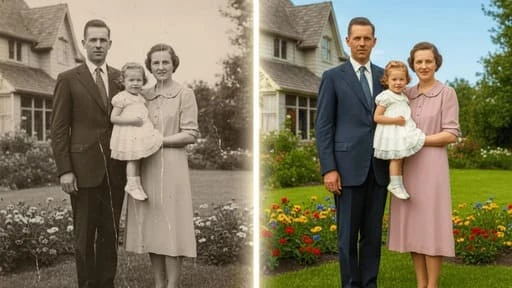
Everyone has them: shoeboxes or old albums filled with faded, scratched photos. They are precious memories locked in the past. Evoke’s first trick is pure restoration magic. As a powerful Best Free Photo Enhancer, it wipes away the damage of time and allows you to Enhance Portrait Free of charge:
- Repair Blurry Portrait: Instantly Repair Blurry Portrait issues, sharpening low-resolution photos to make them crystal clear.
- Colorize Photo Free: Give vibrant, lifelike color to old black-and-white pictures with Colorize Photo Free technology.
- Erase Damage: Intelligently repair scratches, creases, and tears.
Seeing a grandparent’s wedding photo suddenly bloom into full color is a true "wow" moment. This emotional connection is what makes Evoke special, inviting you to use the Upscale Portrait Best features to keep exploring.
Find Your Inner Artist with the Ghibli Filter
Once your photos are looking pristine, it's time to get creative with a Ghibli Anime Style transformation. With a single tap, you can transform any picture—a selfie, a pet photo, a landscape—into the dreamy, hand-painted world of an anime film. It’s the beautiful aesthetic that has taken over social media.
Become Your Own Collectible Action Figure
Now for the truly mind-blowing part. Remember that "character consistency" tech? Evoke uses the Nano Banana Pro Style Action Figure engine to turn you into your very own collectible toy character. This isn't just a filter; the app generates a complete image of you packaged in your own custom box.
It's a huge trend online, and now it's your turn. Just upload a photo, pick a theme from the "AI Portraits" gallery, and watch as the app creates a shockingly accurate toy version of you. Then, use the Best Free Photo Animator to Animate Portrait Free and watch yourself come to life.
Here is how Google's pro-level technology becomes your creative playground in Evoke:
| Google Gemini Feature | How You Experience It in the Evoke App |
|---|---|
| Character Consistency | Nano Banana Pro Style Action Figure (Toy versions that look like you) |
| Semantic Understanding | Enhance Portrait Free (Context-aware adjustments) |
| Artistic Style Transfer | Ghibli Anime Style (Apply artistic anime styles to any photo) |
| Advanced Detail Recovery | Repair Blurry Portrait (Unblur and recover facial details) |
The Future of Photography is Fun
AI doesn't have to be a complex, distant concept. The incredible power of Google’s Nano Banana Pro is here, and apps like Evoke make it simple, intuitive, and truly fun for everyone. Use the Generate Video Photo Best tools to see the future today.
Stop reading about the AI revolution and start joining it. Bring an old family photo back to life, cast yourself in an anime film, or finally unbox the Nano Banana Pro Style Action Figure you were always meant to be.
Evoke offers free features with ads. You can watch ads to unlock free templates, and subscriptions include a free trial plus recurring video credits.
Download the Evoke App and Start Creating Today!
Frequently Asked Questions
How to Animate Portrait?expand_more
To Animate Portrait Free, simply upload a photo to Evoke and select the "Animate" feature. The Best Free Photo Animator will add realistic movements like blinking and nodding instantly.
How to Repair Blurry Portrait?expand_more
Use Evoke's "Enhance" tool to Repair Blurry Portrait issues. It uses Nano Banana Pro technology to sharpen edges and restore lost textures in low-quality images.
How to Colorize Photo?expand_more
Evoke allows you to Colorize Photo Free of charge. Just upload a black and white photo, and the AI will analyze the scene and apply historically accurate colors automatically.
Does Evoke really match Gemini 2.5 Flash quality?expand_more
In the specific niche of portrait generation, Evoke has undergone extensive mobile-specific tuning. This results in faster and higher-quality outputs for Generate Video Photo Best tasks on smartphones.
AI Photo Team
AI technology experts passionate about bringing cutting-edge solutions to users worldwide.

