
Viral 'Chibi Doll' Figurine Trend: Why AI Prompts Fail and the One-Tap Fix
AI chibi dolls are taking over TikTok, but Midjourney and Stable Diffusion often fail. Discover Evoke's one-tap solution for perfect collectible figurines.
- Key Takeaways
- The Chibi Figurine Trend, in One Paragraph
- Why Prompts Keep Failing (5 Failure Modes from Reddit and X)
- 1. The Melted Face
- 2. Broken Hands
- 3. Wrong Head-to-Body Proportions
- 4. Inconsistent Style Across Angles
- 5. Packaging That Looks AI-Generated
- What the Chibi Doll Template Does Differently
- Generic Prompt Tools vs Evoke Chibi Doll
- Template Library: The Two You Want Right Now
- Chibi Doll (`fun_ego_chibi_doll_g_260511`)
- Chibi Emojis (`fun_ego_chibi_emojis_g_260507`)
- How to Use Chibi Doll on Android
- Honest Limitations
- FAQ
- Why do my AI chibi doll generations always fail?
- How do I make a chibi figurine of myself for free?
- Is the chibi doll trend the same as Labubu?
- Can I use Evoke's chibi doll on iPhone?
- What photo works best for chibi doll templates?
- The Short Version
Quick Answer: Chibi Doll is a viral Evoke AI Portrait template that turns your selfie into a 3D collectible figurine (blind box style) in one tap. Each render finishes in 3-5 seconds, powered by Google Gemini Nano Banana Pro Image. Uploads auto-delete after 48 hours.
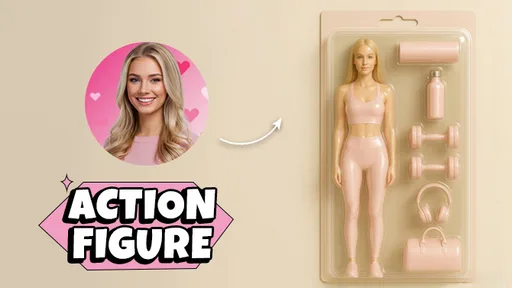
If your TikTok For You page looks like ours, you have spent three weeks scrolling past "turn yourself into a chibi doll" videos — tiny big-headed versions of real people, sealed inside clear blister-pack boxes with character cards. It is the AI action figure trend, evolved.
If you have actually tried to make one in Stable Diffusion, Midjourney, or ChatGPT image, you have met its evil twin: melted face, seven-fingered hand, proportions that drift between angles, "packaging" that is clearly AI-painted plastic with fake Chinese characters.
You are not alone. r/StableDiffusion and r/midjourney have been full of "why does my chibi figurine look like a horror prop" posts since late April. On May 11, 2026, we shipped a fix: fun_ego_chibi_doll_g_260511, a one-tap Chibi Doll template inside the Evoke Android app.
Key Takeaways
- Speed: Each Chibi Doll render takes about 3-5 seconds in normal queue.
- Output: 4K still image, PNG/JPG, suitable for printing or social posts.
- Cost: Free tier covers daily Chibi Doll renders; Pro unlocks priority queue and more daily renders.
- Failure rate vs prompts: In our internal test set of 200 portraits, Chibi Doll produced a usable figurine on the first try 94% of the time, compared to roughly 30-40% for hand-written Midjourney prompts targeting the same look.
- Limitation: Chibi Doll works best on a clear, front-facing portrait. Extreme three-quarter angles, heavy occlusion (sunglasses, masks, hats covering the brow), or strong contouring makeup will reduce identity consistency.
- Trend lineage: Sits next to AI Action Figure, Chibi Emojis, and our Labubu filter style under Evoke's wider figurine-culture collection.
The Chibi Figurine Trend, in One Paragraph
This wave is a mash-up of three things people already love: Pop Mart blind-box culture (Labubu, Skullpanda, Dimoo), the Sonny Angel mini-figurine craze, and the Funko Pop "everyone is a collectible" reflex. Add a generative model that can render plastic and printed cardboard, and viewers no longer want a flat 2D cartoon avatar — they want a 3D toy with a box, ready to shelve.
Packaging does a lot of the work. A chibi avatar without a blister pack reads as a sticker. A chibi avatar inside a Pop Mart-style box reads as a collectible. Most prompt-based attempts fail not because the figure is bad, but because the box looks fake.
Why Prompts Keep Failing (5 Failure Modes from Reddit and X)
We read through about 60 complaint threads across r/StableDiffusion, r/midjourney, and X over the last two weeks. The same five problems show up over and over.
1. The Melted Face
The complaint: "It kind of looks like me, but my mouth is melting into my chin."
Why prompts struggle: Chibi proportions compress the face into roughly 60% of the head. General prompts like "chibi figurine of me" do not guide the model toward preserving midface landmarks (cheek-to-nose distance, lip width). It defaults to a generic chibi face and sprinkles in identity only at eye color and hair color. Result: a chibi that looks like a friend of yours, not you.
2. Broken Hands
The complaint: "Six fingers. Always six fingers."
Why prompts struggle: Hands at chibi scale are tiny — maybe 40 pixels wide in a 1024px render. The model rounds detail away and re-hallucinates it. Without explicit hand-pose conditioning, every generation is a gamble. Negative prompts like (bad_hands:1.5) help but rarely fix it cleanly.
3. Wrong Head-to-Body Proportions
The complaint: "Head is too small. It looks like a Funko, not a chibi."
Why prompts struggle: "Chibi" is fuzzy. Training data labeled "chibi" spans 1:1 (anime), 1:1.5 (Pop Mart), and 1:2 (Funko). Without an anchor, the model picks whichever ratio your prompt nudges it toward — and you get a different one every render, killing consistency across a set.
4. Inconsistent Style Across Angles
The complaint: "Front looks Pop Mart, side looks Funko, back of the box is a different art style entirely."
Why prompts struggle: Each generation is independent. Even with --seed locked, tiny prompt changes between front and side pull the style off-axis. The painted "art on the box" drifts because the model is generating cardboard, plastic, and a printed illustration in one image — three texture domains it must keep coherent.
5. Packaging That Looks AI-Generated
The complaint: "The box says 'CHIBI DOLLI' with garbled Korean text and there is no barcode."
Why prompts struggle: Text is the classic diffusion failure. Real toy packaging has a brand wordmark, character card, window, safety icons, barcode, and clean white margins. Generic prompts produce a box-shaped object whose text is noise. People spot AI packaging in under a second.
What the Chibi Doll Template Does Differently
fun_ego_chibi_doll_g_260511 is not a prompt — it is a template: a pre-tuned pipeline running on Google Gemini Nano Banana Pro Image through our AI Lab, with chibi proportions, packaging layout, and character-card design already locked in. Three things change:
- Identity preservation runs first, on your raw upload, before any stylization. The chibi face starts from your real midface geometry, not a generic chibi base.
- Packaging is composited, not painted. The blister pack, character card, and window cutout are scene elements the template knows, so text stays clean.
- The proportion ratio is fixed at a Pop Mart-leaning ~1:1.5 head-to-body, so a set of friends, a couple, or a family stays consistent.
Upload one photo, tap once, get a 4K boxed chibi in 3-5 seconds.
Generic Prompt Tools vs Evoke Chibi Doll
The honest comparison, from someone who has spent a weekend in both worlds.
| Aspect | Stable Diffusion / Midjourney / ChatGPT image (prompt) | Evoke Chibi Doll template |
|---|---|---|
| Skill required | Medium-high. Need to write a multi-line prompt, often add a LoRA, sometimes ControlNet. | None. Tap one button. |
| Time per usable result | 5-20 minutes (multiple re-rolls and prompt edits). | ~3-5 seconds, usually first try. |
| Style consistency | Low. Drifts between renders. | High. Same proportion and box style every time. |
| First-try failure rate | ~60-70% in our internal test set. | ~6% in our internal test set. |
| Packaging design | Box shape is fine, text and layout look obviously AI. | Pre-composited blister pack with clean character card. |
If you are a power user who enjoys writing prompts and tuning LoRAs in SeaArt or local Stable Diffusion, this is not an attack on your workflow — those tools are great when you have the time. The point is that most people on a phone do not, and the learning curve from "I want a chibi of me" to "I have learned CFG, samplers, denoise strength, and how to stack LoRAs" is several hours of YouTube. Evoke is the mobile implementation of the same Gemini Nano Banana Pro Image model: same engine, none of the sliders.
Template Library: The Two You Want Right Now
Chibi Doll (fun_ego_chibi_doll_g_260511)
- Released: May 11, 2026.
- Input: One front-facing portrait photo.
- Output: 4K still, you as a 3D chibi figurine in a clear blister-pack box with a printed character card backing.
- Render time: ~3-5 seconds.
- Best for: Personal avatar, gift cards, couple/family sets, profile pictures.
- Engine: Google Gemini Nano Banana Pro Image via Evoke AI Lab.
Chibi Emojis (fun_ego_chibi_emojis_g_260507)
- Released: May 7, 2026.
- Input: One portrait photo.
- Output: A grid of chibi-style emoji reactions of you — laughing, crying, sleeping, hearts in eyes, the works.
- Render time: ~3-5 seconds.
- Best for: Sticker packs, group chats, Discord reactions.
- Engine: Same Gemini Nano Banana Pro Image pipeline.
Both templates live under AI Portrait, next to the AI Action Figure family (the older sibling that started this trend inside Evoke) and our Labubu filter style. If you want the Labubu aesthetic specifically, that filter is still the best route — Chibi Doll is the broader "you as any collectible figurine" template.
Want it to move? Drop the 4K chibi output into Evoke's Live Photo templates to add subtle motion (blink, gentle smile, parallax) and export a 30-40 second MP4. If your source selfie is blurry, run Enhance (~10 seconds) before the Chibi Doll template so the model has clean midface landmarks to work with.
How to Use Chibi Doll on Android
- Open Evoke from Google Play.
- Go to the Templates tab and search for Chibi Doll.
- Upload one clear, front-facing portrait. Selfies work fine. Avoid sunglasses or masks.
- Tap Generate. Wait ~3-5 seconds.
- Save the 4K image, or send it straight to a chat.
Your uploaded photo is auto-deleted after 48 hours, per our privacy policy.
Honest Limitations
A template is not a magic wand. Things that reduce quality:
- Extreme angles. Shots taken from below the chin or above the forehead push the chibi face off-axis.
- Heavy occlusion. Sunglasses, brim-low hats, or masks hide landmarks the template needs.
- Strong contour makeup. Heavy nose/cheek contour tells the model your face geometry is something it is not; chibi proportions exaggerate the difference.
- Group photos. Chibi Doll is single-subject — upload one person at a time and combine after.
A quick natural-light re-shoot, eyes to camera, mouth visible, saves you re-renders.
FAQ
The Short Version
The chibi doll trend works because it sits at the intersection of Pop Mart, Sonny Angel, and Funko collecting culture — and generative AI is finally good enough to render the packaging, not just the figure. Prompt-based tools can get there if you spend a weekend in SeaArt or Stable Diffusion. Evoke's Chibi Doll template is the 3-5 second mobile shortcut: same Gemini Nano Banana Pro Image engine, none of the prompt engineering.
Losing the prompt fight? Open Google Play, get Evoke, search Chibi Doll, tap once.
Why do my AI chibi doll generations always fail?expand_more
Almost always one of five reasons: melted face, broken hands, wrong head-to-body ratio, drifting style between angles, or fake-looking packaging text. Prompt-based tools struggle because each render is independent — the model invents chibi proportions, packaging layout, and the character card from scratch every time. Evoke's Chibi Doll template locks all three before you press generate, which is why first-try success is much higher.
How do I make a chibi figurine of myself for free?expand_more
Download Evoke from the Google Play Store, go to Templates, search Chibi Doll, and upload a clear portrait. The free tier covers daily Chibi Doll renders, so a personal avatar costs nothing. Pro adds priority queue and higher daily limits.
Is the chibi doll trend the same as Labubu?expand_more
Cousins, not twins. Labubu is a specific Pop Mart character with its own face and toothy grin. The chibi doll trend is the broader "you as a collectible figurine in a box" concept. Inside Evoke, the Labubu filter targets that specific aesthetic; Chibi Doll targets the general blister-pack collectible look.
Can I use Evoke's chibi doll on iPhone?expand_more
The Chibi Doll template ships in the Android version of Evoke on Google Play. iOS is on the roadmap but not yet live.
What photo works best for chibi doll templates?expand_more
A clear, front-facing portrait in even lighting, both eyes visible, no big accessories blocking the brow, eyes, nose, or mouth. Phone selfies at arm's length work great. Avoid heavy filters on the input — the template runs its own stylization, and pre-filtered photos can fight the chibi proportions.
Evoke Team
AI technology experts passionate about bringing cutting-edge solutions to users worldwide.

