
Viral "Stadium Cam" Trend: Generate One-Tap Broadcast-Grade AI Video
Copy the viral Stadium Cam broadcast trend in one tap. Evoke's new Stadium Cam and Stands Cam Templates render 1080p AI Video in 30-40s on mobile.
- Key Takeaways
- The May 12-13 Stadium Cam Trend, Explained
- How to Make a Viral Stadium Cam Video on Android in One Tap
- Step 1: Pick the Template
- Step 2: Upload One Photo
- Step 3: Tap Generate
- Step 4: Share Before the Trend Cools
- Evoke vs the DIY GPT Image 2 + Seedance 2.0 Workflow
- Structured Template Library: Stadium Cam vs Stands Cam
- Why This Beats the Sora and Kling Path Too
- The Tech Behind Evoke's One-Tap Approach
- Best For / Limitations: Honest Boundaries
- How to Make This Trend Yours (Content Playbook)
- Why Templates Beat Prompts for Trend Content
- Get the Look Tonight
- Frequently Asked Questions
- How do I make a viral Stadium Cam video without writing a prompt?
- Is the Stadium Cam Template free to use on Android?
- What's the difference between the Stadium Cam and Stands Cam Templates?
- How does Evoke compare to the GPT Image 2 plus Seedance 2.0 workflow creators are using on X?
- What kind of photo works best for the Stadium Cam Template, and what doesn't?
Quick Answer: The viral Stadium Cam pseudo-broadcast look is now one-tap AI Video in Evoke. Open the Stadium Cam Template (
vid_viral_stadium_cam_g_260512) or Stands Cam Template (vid_viral_stands_cam_g_260513), drop one photo, and Evoke renders a 1080p MP4 in roughly 30-40 seconds. No 200-word prompt, no model chain.
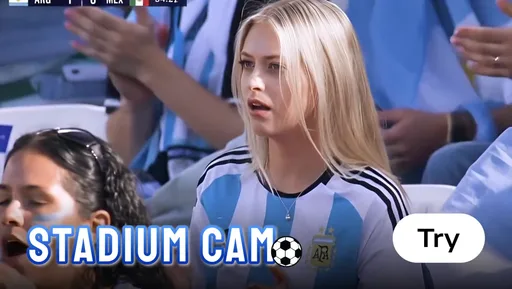
In the last 24 hours, your X feed probably looked like a live sports network. Creators on X/Twitter in mid-May 2026 turned themselves into Champions League heroes, NBA bench legends, and surprise crowd-cam stars — all without ever stepping into a stadium. The viral "Stadium Cam" trend (May 12–13, 2026) is built on pseudo-broadcast aesthetics, specifically the compression of a 200mm telephoto lens and realistic motion physics.
The catch? That prompt is a wall of code-like text. Camera lens, focal length, broadcast logos, motion physics, crowd density — every detail engineered by hand. If you forget one line, the whole illusion collapses.
This week, Evoke shipped two Templates that erase that complexity entirely. One photo in. Broadcast-grade AI Video out. Let's break down the trend, the prompt war, and how to win it with one tap.
Key Takeaways
- The viral Stadium Cam look is generated in 30-40 seconds as a 1080p MP4 inside Evoke on Android.
- Two new Templates ship today:
vid_viral_stadium_cam_g_260512(Stadium Cam) andfun_viral_stands_cam_g_260513(Stands Cam). - The DIY workflow needs a ~200-word Spanish prompt plus two paid models (GPT Image 2 + Seedance 2.0). Evoke replaces all of it with one tap.
- Evoke is Powered by Google Gemini Nano Banana Pro Image, exporting up to 1080p video and 4K photo.
- Limitation: Stadium Cam Templates work best with a clear front-facing portrait. Group photos, heavy occlusion, or extreme side angles can degrade the pseudo-broadcast realism.
The May 12-13 Stadium Cam Trend, Explained
The trend exploded across X and TikTok on May 12, 2026, when Spanish-speaking creators started posting clips that looked like leaked broadcast feeds. The framing is intentionally imperfect — slight camera shake, telephoto compression, lower-third graphics blurred just enough to feel "real" — which is exactly what fools the scroll.
Behind the magic is a two-stage AI Video pipeline:
- GPT Image 2 generates the first frame from a long descriptive prompt (sport, jersey, stadium, lens, lighting, crowd, broadcast aesthetic).
- Seedance 2.0 animates that frame into a 5-10 second clip with believable physics.
The prompts circulating on X are around 200 Spanish words each. They describe everything from "telephoto compression at 200mm" to "JPEG broadcast noise" to "spectators in mid-clap with motion blur." It works — but only if you understand prompt engineering, can read Spanish, and are willing to pay per generation across two services.
That is the moment Evoke saw, and shipped a fix for, in 48 hours.
How to Make a Viral Stadium Cam Video on Android in One Tap
Here is the entire Evoke workflow. No prompt, no Spanish, no model switching.
Step 1: Pick the Template
Open Evoke and search "Stadium Cam" or "Stands Cam." Two new entries appear under AI Video Templates:
- Stadium Cam — the field/court pseudo-broadcast (the one Fran Pradas's clip popularized).
- Stands Cam — the "spotted in the crowd" angle (think Coldplay-cam, but for sports).
Step 2: Upload One Photo
Drop in a clear front-facing portrait. Phone selfies work. Even casual photos from your gallery work. The Template handles wardrobe, lighting, lens, and broadcast graphics for you.
Step 3: Tap Generate
Evoke renders a 1080p MP4 in 30-40 seconds. That includes the AI Photo enhance pass (~10s) plus the AI Video render. You'll see a preview, then export to TikTok, Reels, or X with one tap.
Step 4: Share Before the Trend Cools
Stadium Cam trends move fast. The 24-hour window is the high-ROI moment. Evoke's instant-access model (no invite, no queue) is what makes catching that window possible from Android.
Evoke vs the DIY GPT Image 2 + Seedance 2.0 Workflow
Here's the head-to-head. We're comparing the exact prompt-heavy stack the May 12 viral creators are using against the Evoke Template path.
| Dimension | DIY (GPT Image 2 + Seedance 2.0 + Venice) | Evoke (Stadium Cam Template) |
|---|---|---|
| Prompt Length | ~200 words, Spanish | Zero. Pick a Template. |
| Cost | Multiple paid APIs / credits | Free tier on Android (ad-supported) |
| Time | 5-15 minutes (write prompt, two model runs, edit) | 30-40 seconds end-to-end |
| Output | 720p–1080p, inconsistent quality between runs | 1080p MP4, consistent Template look |
| Skill Required | Prompt engineering, Spanish reading, model chaining | One tap, one photo |
| Platform | Web only, multi-tab | Native Android (Google Play) |
| Failure Risk | High — one missed phrase breaks realism | Low — Template handles physics + framing |
The DIY route is impressive when it works. But it's a craft skill, not a content workflow. Evoke turns it into a content workflow.
Structured Template Library: Stadium Cam vs Stands Cam
Two Templates ship in this drop. Same trend, two distinct shots. Use them together for a one-two punch on the timeline.
| Scenario | Template Name | Input | Output | Best For |
|---|---|---|---|---|
| On-field pseudo-broadcast | vid_viral_stadium_cam_g_260512 (Stadium Cam) |
1 front-facing portrait | 1080p MP4, ~6s, broadcast lens look | "Imagine me in the Champions League final" memes, sports edits, fan reels |
| Crowd-cam celebrity moment | fun_viral_stands_cam_g_260513 (Stands Cam) |
1 front-facing portrait | 1080p MP4, ~6s, telephoto crowd zoom | "Spotted in the crowd" gags, kiss-cam parody, surprise cameo content |
Both Templates run on the same Evoke pipeline: AI Photo enhance pass, AI Video render via Google Gemini Nano Banana Pro Image, automatic broadcast-style color grade, and motion physics tuned for sports footage. You don't see those stages — you see one progress bar.
Why This Beats the Sora and Kling Path Too
Stadium Cam isn't the only trend creators are chasing this month. The broader question is: where do you actually generate viral AI Video right now, on a phone, without a waitlist?
- Sora (OpenAI): Still gated by invite/waitlist, web-first, iOS-leaning. If you're on Android and the trend drops tonight, Sora is not the answer.
- Kling AI: Free tier caps at 720p with watermarks; the Pro plan is $25/mo. Evoke renders 1080p on the free tier, on Android, no watermark on Pro.
- GPT Image 2 + Seedance 2.0 (the trend's actual stack): Powerful, but it's a two-model relay race with a prompt boss fight in the middle.
Evoke's positioning is simple: download now, tap once, post the same hour. The model engine is Google's. The interface is yours.
The Tech Behind Evoke's One-Tap Approach
Under the hood, Evoke is Powered by Google Gemini Nano Banana Pro Image — the same family of models powering top-tier consumer AI photo and video features. Evoke wraps that model in pre-tuned Templates so you skip the prompt layer entirely.
A few specifics worth quoting:
- AI Photo Enhance: ~10 seconds, output up to 4K.
- AI Portrait: 3-5 seconds for clean facial restoration.
- AI Video / Live Photo: 30-40 seconds, output up to 1080p MP4.
- Privacy: No face data storage; uploads auto-delete after 48 hours.
- Platform: Android via Google Play.
That last line matters for Stadium Cam specifically. Trend clips often include faces of friends, partners, or the creator themselves. The 48-hour auto-delete policy is why people are comfortable running selfies through Evoke instead of an unfamiliar web pipeline.
Best For / Limitations: Honest Boundaries
We promise specifics, so here are the boundaries on the Stadium Cam and Stands Cam Templates.
Best For:
- Single-subject portraits with a clearly visible face.
- Front-facing or slight three-quarter angle (chin up, eyes toward camera).
- Casual outdoor or studio lighting — neutral exposure, no extreme backlight.
- Posts where you want the "is this real broadcast footage?" double-take.
Limitations:
- Not designed for group photos. Multiple faces confuse the Template's crop and lens-compression logic.
- Heavy occlusion (sunglasses covering eyes, mask, hat brim shadowing the face) reduces the realism of the broadcast crop.
- Extreme side profiles can break the telephoto compression illusion.
- Sport-specific jerseys are stylized by the Template, not photo-matched — if you need an exact club kit, you'll still want to edit a logo on top in your editor of choice.
Knowing what a Template cannot do is the difference between a viral hit and a re-shoot. Use the right input, win the trend.
How to Make This Trend Yours (Content Playbook)
A few quick ideas creators are already running with the new Templates:
- The "Bench Legend" remix. Stands Cam Template + caption "When the coach finally calls my name." Works for any sport.
- The "Kiss Cam Caught Me Solo" gag. Stands Cam Template, paired with a deadpan reaction shot you film in 5 seconds on your phone.
- The "Imagine If I Played" cosplay. Stadium Cam Template + your favorite jersey color in the input photo.
- The brand cameo. Brands and creators can drop a product hero shot into Stands Cam Template — it reads as "spotted in the crowd" product placement without staging a real event.
- The dual-post. Run Stadium Cam first, then Stands Cam of the same person. The narrative "on the field, in the stands" doubles dwell time on a single post.
The pattern is consistent: pair the Template's broadcast aesthetic with a human caption, and the algorithm rewards the contrast.
Why Templates Beat Prompts for Trend Content
There's a structural argument worth making here. Trend content has a 24-72 hour ROI window. Inside that window, speed of output beats sophistication of output.
A 200-word Spanish prompt is sophisticated. But the moment you have to debug it, rewrite it, retranslate it for your scene, or rerun it because Seedance hallucinated a fifth limb, you've burned the window. The trend has moved on.
Evoke's Templates are a different bet: lock the sophistication once, ship it as a one-tap path, and let creators spend their attention on the caption and the post timing. That's why one-tap Templates are quietly becoming the dominant input method for viral AI Video — and why Evoke is doubling down on shipping new Templates within hours of a trend breaking, not weeks after.
The Stadium Cam and Stands Cam Templates are a proof point. The trend broke on May 12. The Templates shipped on May 12 and May 13. The article you're reading is on May 14. That's the cadence.
Get the Look Tonight
Download Evoke on Google Play, search "Stadium Cam" or "Stands Cam," and upload one photo. You'll have a broadcast-grade clip in the time it takes to write the tweet you'll post it under. No prompt. No queue. No Spanish dictionary.
Ready to catch the trend? Download Evoke on Google Play and try the Stadium Cam and Stands Cam Templates today. Powered by Google Gemini Nano Banana Pro Image. One tap, one photo, one viral clip.
Frequently Asked Questions
How do I make a viral Stadium Cam video without writing a prompt?expand_more
Open Evoke on Android, pick the Stadium Cam Template (vid_viral_stadium_cam_g_260512), upload one clear front-facing portrait, and tap generate. The Template renders a 1080p AI Video in roughly 30-40 seconds — no prompt engineering, no Spanish, no model chaining.
Is the Stadium Cam Template free to use on Android?expand_more
Yes. The Stadium Cam and Stands Cam Templates are available on Evoke's free tier (ad-supported) via Google Play. Compared to Kling AI's $25/mo Pro plan or Sora's invite-only waitlist, Evoke gives you 1080p MP4 output and instant access without a paywall.
What's the difference between the Stadium Cam and Stands Cam Templates?expand_more
Stadium Cam (vid_viral_stadium_cam_g_260512) places you on the field with a pseudo-broadcast lens look — think Champions League final telephoto framing. Stands Cam (fun_viral_stands_cam_g_260513) frames you in the crowd, perfect for "spotted in the stands" or kiss-cam parody content. Many creators run both back-to-back on a single subject for a one-two punch post.
How does Evoke compare to the GPT Image 2 plus Seedance 2.0 workflow creators are using on X?expand_more
The DIY workflow needs a ~200-word Spanish prompt, two paid model runs, and 5-15 minutes per clip. Evoke compresses the same look into one Template, one photo, and 30-40 seconds. The trade-off: Evoke offers less per-shot customization, but a 24-hour trend window doesn't reward customization — it rewards speed.
What kind of photo works best for the Stadium Cam Template, and what doesn't?expand_more
Best: a single subject, clear face, front-facing or slight three-quarter angle, neutral lighting. Avoid: group photos, heavy occlusion (sunglasses, masks, deep hat shadows), or extreme side profiles. The Template uses telephoto compression logic that depends on a readable face — give it that, and the broadcast illusion lands every time.
Evoke Team
AI technology experts passionate about bringing cutting-edge solutions to users worldwide.

