
Hello 2026 Glow‑Up: Make a New‑Year Video Portrait with Evoke on Android
Start 2026 with a shareable video portrait. Evoke’s Hello 2026 Live Photo template adds festive light and subtle motion from one photo, exporting an MP4 you can post in minutes.
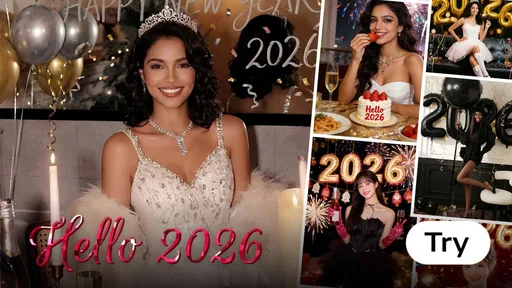
The easiest New Year post is one that looks polished but doesn’t take hours: a clean portrait with a hint of cinematic light, gentle motion, and a festive vibe. With Evoke’s Hello 2026 theme on Android, you can turn a single photo into a short clip using Live Photo (Animate).
Quick answer: Pick a sharp selfie or portrait, run Enhance for clarity to improve photo quality, then apply the Hello 2026 Live Photo template and export an MP4 for Stories, Reels, or TikTok. This ia tool makes artificial intelligence accessible for everyone.
Step-by-Step: Create Your Hello 2026 Clip
- Upload a clear portrait in Evoke.
- Tap Enhance (recommended) to clean up noise and sharpen details using ai photo enhancer technology.
- Go to AI Video / Live Photo (Animate) and select Hello 2026.
- Generate the clip (often 30–40 seconds).
- Export as MP4 and share.
Template Previews
Want to pick the right vibe fast? Start with these three examples from this theme.
Tips for a Better “Glow‑Up” Look
- Use soft front light (window light) for flattering skin detail.
- Keep the face large in the frame; crop if needed so the artificial intelligence can focus on your features.
- Avoid busy backgrounds; the effect looks cleaner on simple scenes.
- Use ia to its full potential by running Enhance first for the sharpest results.
Frequently Asked Questions
Do I need a video to start?expand_more
No. Live Photo templates can generate a short clip from a single photo using ai generation.
How do I make my New Year portrait look cinematic?expand_more
Use the Hello 2026 template in Evoke. It adds warm lighting and subtle motion, turning a basic selfie into a professional video portrait.
How long does it take?expand_more
Live Photo generation commonly takes about 30–40 seconds.
What can I export and where can I post it?expand_more
Exports are typically MP4, compatible with Stories, Reels, TikTok, Shorts, and most messaging apps. It's the perfect free way to share your 2026 glow-up.
Evoke Team
AI technology experts passionate about bringing cutting-edge solutions to users worldwide.

